

Beyond Compliance: How Digital Accessibility Improves User Experience for All
A Q&A with Shannon Urban on Compliance, Challenges, and Inclusive Design
Digital accessibility isn’t just about compliance—it’s about creating a better, more inclusive experience for everyone. With the recent updates to ADA Title II, public entities now have clearer guidelines to follow, making accessibility a top priority. But what does this mean in practice? How can organizations ensure their digital content meets WCAG 2.1 AA standards while also improving the user experience?
At CourseArc, we believe accessibility should be embedded in every step of the content creation process, not just treated as a checkbox. To unpack the latest changes and share actionable insights, we sat down with Shannon Urban, Accessibility Director at McGraw Hill, who supports CourseArc with accessibility work. As a Certified Professional in Accessibility Core Competencies (CPACC) and an expert in digital accessibility, Shannon shares her perspective on what organizations need to know—plus practical steps to move beyond compliance and build truly inclusive digital experiences.
Here’s our conversation.*
(Unsure of where to begin on your accessibility journey? Don’t panic. We’ve created a handy downloadable guide to help you.)
In a nutshell, can you explain the key takeaways from the new ADA Title II ruling and how it impacts public entities?
Previously, we had both the ADA and Section 508, but there was no firm requirement for compliance with WCAG. Section 508 acknowledged the importance of WCAG but it only applied to federal agencies and did not mandate compliance. The new ADA Title II ruling changes that by clearly defining and enforcing accessibility standards for state, local, and public entities that receive public funding. Under this ruling, these entities are now required to comply with WCAG 2.1 Levels A and AA, eliminating any guesswork or subjectivity in ensuring digital accessibility.
Why is WCAG 2.1 AA the standard for compliance, and what are the most common accessibility barriers organizations need to address?
It’s not the most recent version, which is WCAG 2.2, but when they were drafting this rule, 2.1 was the guideline at the time. It is a nice middle ground to make sure everyone can achieve it.
One of the biggest barriers organizations face is the accessibility of older but still relevant content. If a document or webpage is outdated and no longer serves a purpose—like an old meeting notice—it doesn’t need to be remediated. However, if older content remains relevant, such as important PDF documents or reports, it must be made accessible. The sheer volume of legacy content can be overwhelming, making it crucial for organizations to prioritize remediation. On the other hand, updating website accessibility is generally more manageable since modern HTML, when properly done, is more straightforward to remediate.
Many public entities struggle with making legacy digital content accessible. What steps should they take to prioritize remediation?
The first step in addressing accessibility for legacy content is to assess what is still relevant and remove anything that is no longer needed. You can’t move forward until you understand the scope of the issue. Once you’ve identified what remains, the next step is to consult an accessibility specialist who can guide the remediation process.
Organizations may need to approach remediation in phases, prioritizing the most critical and frequently accessed content first. For public entities, this often means focusing on essential documents and resources that serve the widest audience. Since remediation requires specialized skills, hiring an expert and securing the necessary funding is key to ensuring compliance.
In summary, organizations should:
- Assess content to determine what is still relevant.
- Prioritize remediation, focusing on the most important and frequently accessed content first.
- Hire an accessibility expert to ensure compliance and guide the process effectively.
What role does automated accessibility testing play in compliance, and how does it compare to manual testing by experts?
Automated accessibility testing can serve as a useful starting point, identifying approximately 30–40% of potential issues. However, it does not replace manual testing. Many accessibility barriers—such as those related to usability, keyboard navigation, or screen reader compatibility—require human evaluation to detect and resolve effectively.
While automated tools can help organizations get started, manual testing remains essential for achieving full compliance and ensuring an inclusive user experience. Personally, I focus exclusively on manual testing, as it provides a more thorough and accurate assessment of accessibility challenges.
Beyond legal compliance, how does digital accessibility improve user experience for all, not just people with disabilities?
Accessibility isn’t just about meeting legal requirements—it enhances the overall user experience. Accessible design leads to cleaner code and a more intuitive, user-friendly interface. When digital content is designed with accessibility in mind, it naturally becomes more functional and efficient for everyone.
Accessibility also drives innovation. Many solutions originally developed for people with disabilities end up benefiting a wider audience. For example, curb cuts and ramps were designed for wheelchair users but also help parents with strollers, travelers with rolling suitcases, and even cyclists. The same principle applies to digital accessibility—features like captions, voice commands, and simplified navigation improve usability for all users, not just those with disabilities.
“Accessibility also drives innovation. Many solutions originally developed for people with disabilities end up benefiting a wider audience.”
What are some common misconceptions organizations have about accessibility, and how can they move beyond a compliance mindset to a more inclusive approach?
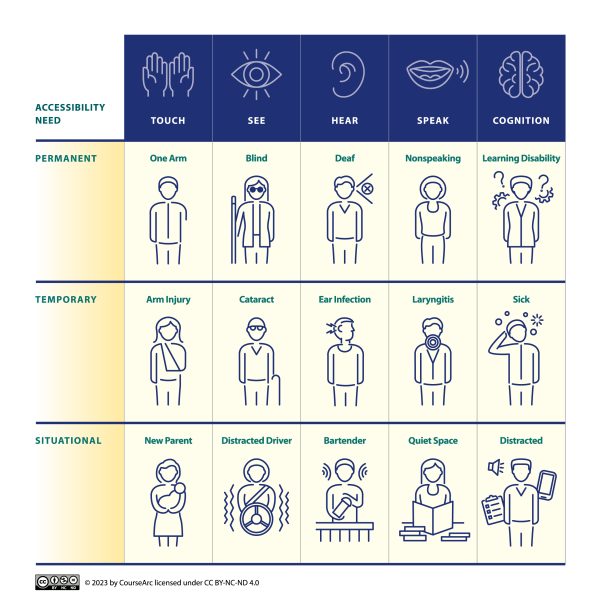
One of the most common misconceptions about accessibility is that it only benefits a small percentage of the population. Many organizations question whether the effort is worth it, not realizing that accessibility improvements enhance the experience for all users. Features designed to assist people with disabilities—again, things like captions, keyboard navigation, and clear visual contrast—also improve usability for a much broader audience, including aging populations, people in temporary situations (like a noisy environment), and even general users who prefer more intuitive design.
Another major misconception is that accessibility is a one-time fix or something that stifles creativity. Some companies market quick-fix solutions—like snippets of code that claim to make content fully accessible—but these often fail to address deeper usability issues. True accessibility requires thoughtful, ongoing effort and should be integrated into design and development from the start.
The best way to move beyond a compliance-only mindset is to involve people with disabilities in the conversation. Their lived experiences provide invaluable insights into what truly makes content accessible and user-friendly. Even if there were no legal requirements, ensuring equal access should be a priority—because accessibility is not just about compliance, it’s about inclusion and equity.
For organizations just starting their accessibility journey, what are the first three actionable steps they should take?
- The first step is to define a clear accessibility policy. Organizations should establish a commitment to accessibility moving forward. For example, a policy might state: “All new digital content and materials will be designed with accessibility in mind and will adhere to the latest WCAG guidelines.” Additionally, it’s important to outline a strategy for handling existing content—determining what needs to be remediated and how older assets will be addressed.
- Next, organizations should assess and categorize their content. This involves identifying what content is still relevant and evaluating its current level of accessibility. Some materials may no longer be necessary and can be archived, while others require remediation. Understanding the scope of work is critical before moving forward.
- Finally, organizations need to develop a concrete action plan. This includes determining whether in-house expertise is sufficient or if external specialists need to be hired. Prioritization is also key—focusing first on the most frequently accessed or legally required content. By aligning resources and setting a structured approach, organizations can ensure a sustainable, long-term commitment to accessibility.
While the specific approach may vary for each organization, these foundational steps provide a roadmap for building a more inclusive digital experience.
*This interview has been edited for length and clarity.

Shannon Urban brings over two decades of experience in education—first as a teacher in both brick and mortar school districts and virtual school districts, then as a product manager and accessibility specialist in ed tech, then as an Accessibility Director. She has extensive experience in market research, user testing with people with disabilities, competitive analysis and developing and managing enterprise-level accessibility programs. Shannon is a Certified Professional in Accessibility Core Competencies (CPACC), issued by the International Association of Accessibility Professionals (IAAP).
CourseArc, a content authoring and management system (CAMS) supports organizations as they facilitate the collaborative creation of engaging and accessible online learning. Check out our resource site to see how we can help your team. Check back to our blog and social media feeds for additional resources and case studies on how our clients are using CourseArc to move their classrooms online.


Leave A Comment